공통 · 2026-09-17
How the CPU and GPU Execute Work Together
Distinguish CPU requests from GPU execution, then use buffers, streams, and events to explain data preparation, completion waits, and execution order.
In the previous article, we looked at how a kernel’s threads are grouped into blocks and warps and executed inside the GPU. This time, we will widen our view to the whole program. Once a kernel is ready to run on the GPU, who prepares its input and requests its execution? When can the next operation that needs its result begin?
We will start by distinguishing when the CPU requests work from when the GPU completes it. First, we will connect the calling code on the CPU to the kernel body on the GPU and see where inputs and results are stored. Then we will look at how work is submitted in order and when the CPU needs to wait for results. Finally, we will place independent work in separate streams and connect operations that exchange results with the execution order they need.
Throughout the article, computation A adds 1 to an input array, and computation B doubles that result. At the end, we will add computation C, which uses data separate from A and B.
The figures and code use CUDA to request work on an NVIDIA GPU. You do not need to know CUDA syntax to read this article. The prose and figures explain the execution flow, and comments describe what each step of the code does. It is enough to follow the comments through preparation → copying → requesting computation → using results. ... marks omitted details; these examples are not complete programs that you can run as written.
Launching GPU Kernels from CPU Code
Suppose input x is [1, 2, 3, 4]. Computation A adds 1 to each element to produce the intermediate values u, [2, 3, 4, 5]. Computation B doubles each element of u to produce result y, [4, 6, 8, 10]. Because B reads u produced by A, B must execute after A’s result is ready.
A program that assigns this computation to the GPU contains both code that runs on the CPU and code that runs on the GPU. The CPU code prepares input, requests memory space on the GPU, and calls copy and kernel launch operations. On the GPU, kernel threads compute the elements assigned to them.
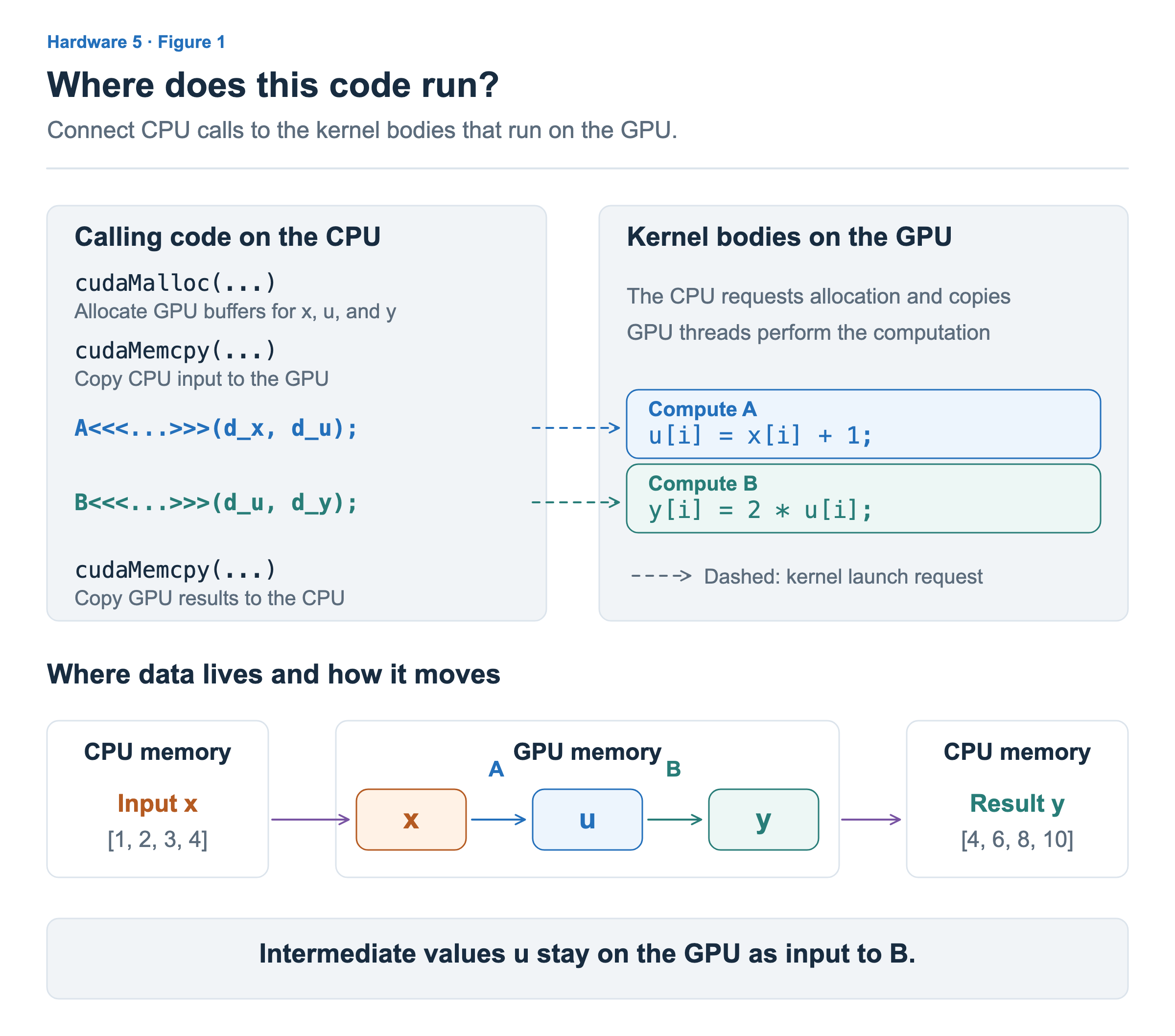
The call to A on the left of Figure 1 is CPU code that requests execution of computation A on the GPU. The kernel body on the right is the computation that the GPU performs in response. As we saw in the previous article, each GPU thread reads its assigned element, adds 1, and writes the value to u.
The key distinction is that the CPU requests execution, and the GPU performs the requested computation. In this article, the code requesting memory allocation and copies also runs on the CPU, outside the kernel. Focus on these roles rather than the function names or details inside parentheses. CUDA kernel definitions and launches
Preparing GPU Space for Inputs and Results
The GPU needs space for each piece of data to read x and write u and y. A region of memory that holds data is called a buffer. In this example, the CPU input and result buffers are separate from the GPU buffers for x, u, and y.
The following simplified code follows the CPU flow in Figure 1. We assume input x has already been prepared on the CPU. A and B perform the computations described above, and A<<<...>>>(...) requests execution of A on the GPU. Detailed arguments, error handling, and resource cleanup are omitted.
// Allocate GPU space for input x.
cudaMalloc(...);
// Allocate GPU space for intermediate values u.
cudaMalloc(...);
// Allocate GPU space for final result y.
cudaMalloc(...);

// Copy input x, prepared on the CPU, to the GPU.
cudaMemcpy(...);

// Request computation A on the GPU: add 1 to x to produce u.
A<<<...>>>(...);
// Request computation B on the GPU: double u to produce y.
B<<<...>>>(...);

// Copy result y from GPU to CPU and wait for the copy to finish.
cudaMemcpy(...);
// The CPU can now use result y.
Allocating space and filling it with data are separate operations. After allocating GPU space for x, we must copy the input prepared by the CPU into that space. A and B write their computed values into the spaces for u and y, respectively. The four-element array is a small example for following this flow.
At the bottom of Figure 1, intermediate values u stay in GPU memory. Even though the CPU calls both A and B, there is no need to bring u back to the CPU and send it to the GPU again. Data needed by the next GPU computation can remain on the GPU, and only the final result needed by the CPU has to be brought back.
Submitting Work to a Stream in Order
A call to B following a call to A in CPU code does not mean that the CPU waits for A’s computation to finish before calling B. A kernel launch is an asynchronous call: after requesting GPU work, CPU code can continue before that computation finishes. When a function call ends and control returns to the next line, we say the call “returns.” A kernel launch returning does not mean the GPU computation is complete. CUDA API synchronization behavior
Why, then, is the order preserved even if we call B before A finishes? In CUDA, operations such as copies and kernel launches are submitted to a stream. A stream specifies a sequence in which submitted GPU operations execute. Calls that do not explicitly specify a stream, as in the preceding code, use the default stream.
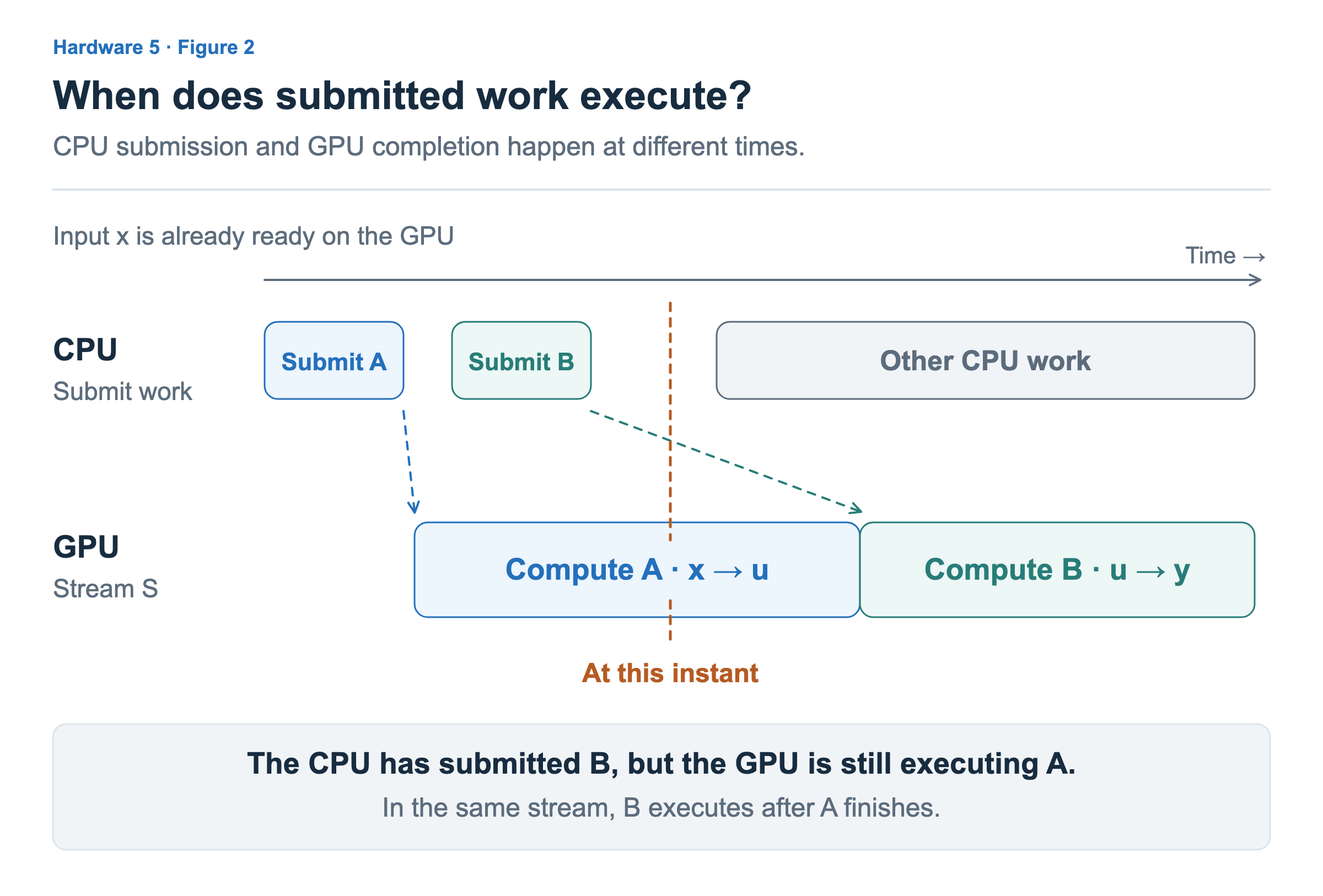
Figure 2 shows A and B executing after the input copy is complete. The top row shows when the CPU submits work, and the bottom row shows when the GPU actually computes. At the instant marked by the vertical line, the CPU has finished submitting B, but the GPU is still executing A. B waits for its turn in the same stream.
In this example, B executes after A finishes in the same stream, so it can read u produced by A. If the input copy was submitted first, the sequence is copy → A → B. The CPU does not need to check the completion of each operation individually to preserve this order. Execution order in CUDA streams
Here, we need to distinguish overlapping CPU and GPU progress from overlapping execution of A and B on the GPU. The CPU can submit more work or do something else, but A and B execute one after the other in the same stream.
Waiting When the CPU Needs Results
When continuing with another computation inside the GPU, stream order can connect that computation to the point when its input is ready. Now suppose the CPU needs to read and use the actual values of final result y. B must finish computing, and its result must be copied to CPU memory.
The last step in the preceding code is this GPU→CPU result copy. In this direction, the copy call we use (cudaMemcpy) makes the CPU wait until the copy is complete. When CPU code moves to the next line, it can use y, which has arrived in CPU memory. How the CPU waits can differ depending on the copying method; here, we examine a case where it proceeds to the next line after the result copy finishes. Return conditions by copy direction
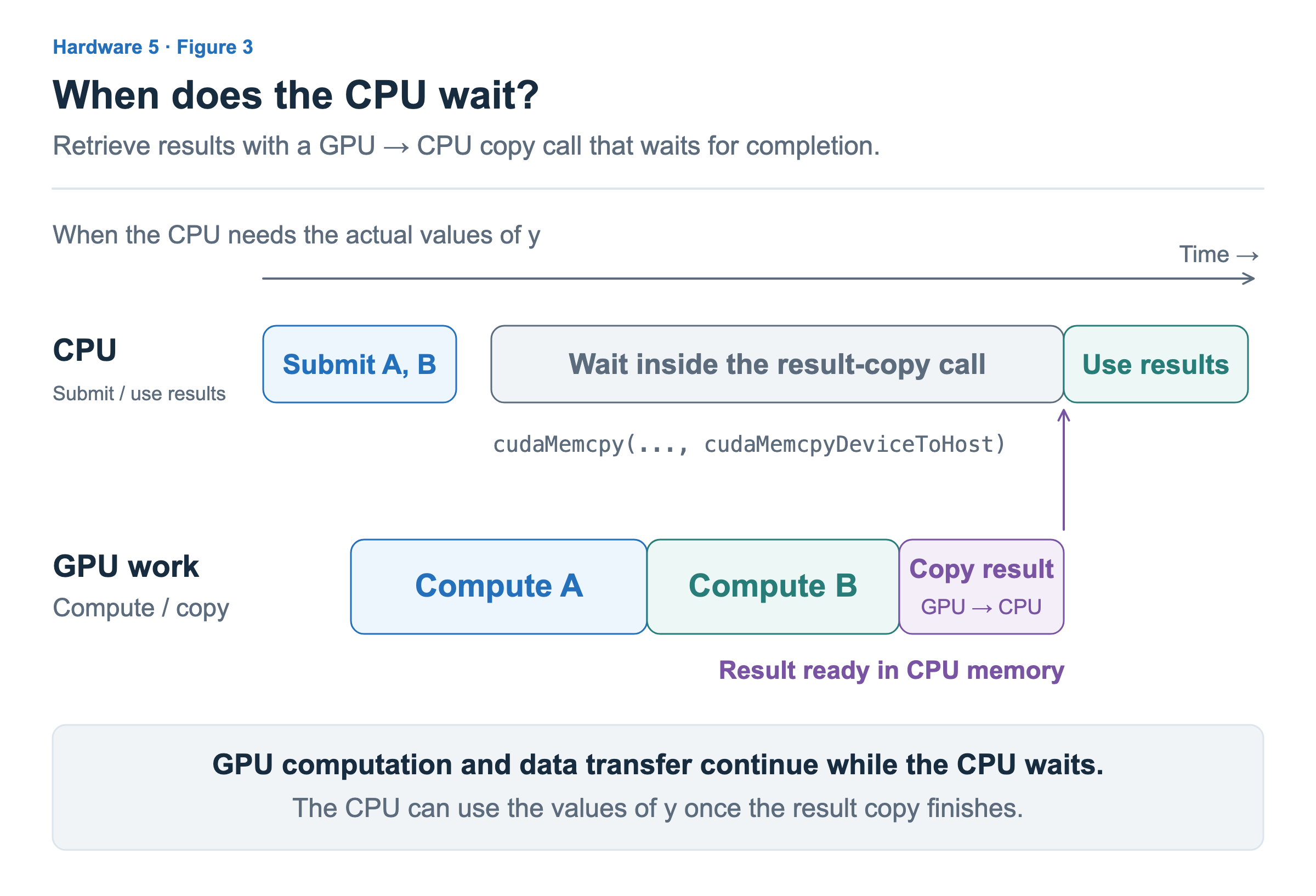
In Figure 3, the GPU is still computing A when the CPU calls the result copy. The copy needs B’s result, so it proceeds after A and B finish. The time the CPU spends inside the copy call can therefore include not only the data transfer itself, but also time waiting for earlier GPU computations to finish.
The thread waiting here is the CPU thread that made the call. Meanwhile, the GPU computes A and B and transfers data. A long CPU wait alone does not tell us that the GPU was idle. CPU waiting and GPU execution also overlap, so we cannot add their durations to obtain the total time.
Waiting for completion and copying data must also be distinguished. We can make the CPU wait until all work previously submitted to a particular stream has finished. Waiting for completion alone does not copy GPU data into CPU memory. If the CPU needs to read the data, the necessary copy must also be requested. The CUDA function used to wait for stream completion is cudaStreamSynchronize. Stream completion wait API
Placing Independent Work in Separate Streams
A and B must follow a particular order. Now suppose computation C uses separate input and output buffers, does not read A’s result, and does not modify the data used by A or B. C does not need to wait for A to finish before making progress.
Such work can be placed in different streams. The developer, framework, or library creates streams and decides which stream receives each operation. In this example, CPU code creates streams S₀ and S₁ for the same GPU, placing A in S₀ and C and B in S₁. The GPU does not analyze the computations and automatically split them into two streams.
Creating streams does not divide the GPU’s SMs into two groups or reserve dedicated resources for each stream. The program specifies the flow of work, and the CUDA execution system makes progress according to the available work and GPU resources. The assignment of kernel blocks to actual SMs follows the execution structure we examined in the previous article.
Operations in different streams can overlap when their dependencies are satisfied and the hardware and execution resources allow it. If a kernel that started first uses much of the SM residency capacity, registers, or shared memory, another kernel may have to wait. Creating multiple streams does not guarantee concurrent execution. Concurrent kernel execution and its conditions
Even when execution overlaps, performance does not necessarily improve. If two operations compete for the same memory bandwidth, each may take longer. We need to create opportunities for independent work to run and then check whether the total completion time actually decreases.
One condition remains. C is independent of A, but B in S₁ still needs result u from A. The order between A and B in different streams must be connected explicitly.
Connecting Stream Order with Events
A CUDA event can be used to determine whether work has completed up to a particular point in a stream. Here, we request that event E be recorded immediately after A in S₀. When this event completes, we know that A has finished. The CPU’s request to record an event and the event’s completion as GPU work progresses happen at different times. Recording CUDA events
In S₁, we place a wait for event E to complete after C, then submit B after that wait. C can make progress first, while B can execute only after E completes.
Stream S₀: Compute A → Record event E
Stream S₁: Compute C → Wait for E to complete → Compute B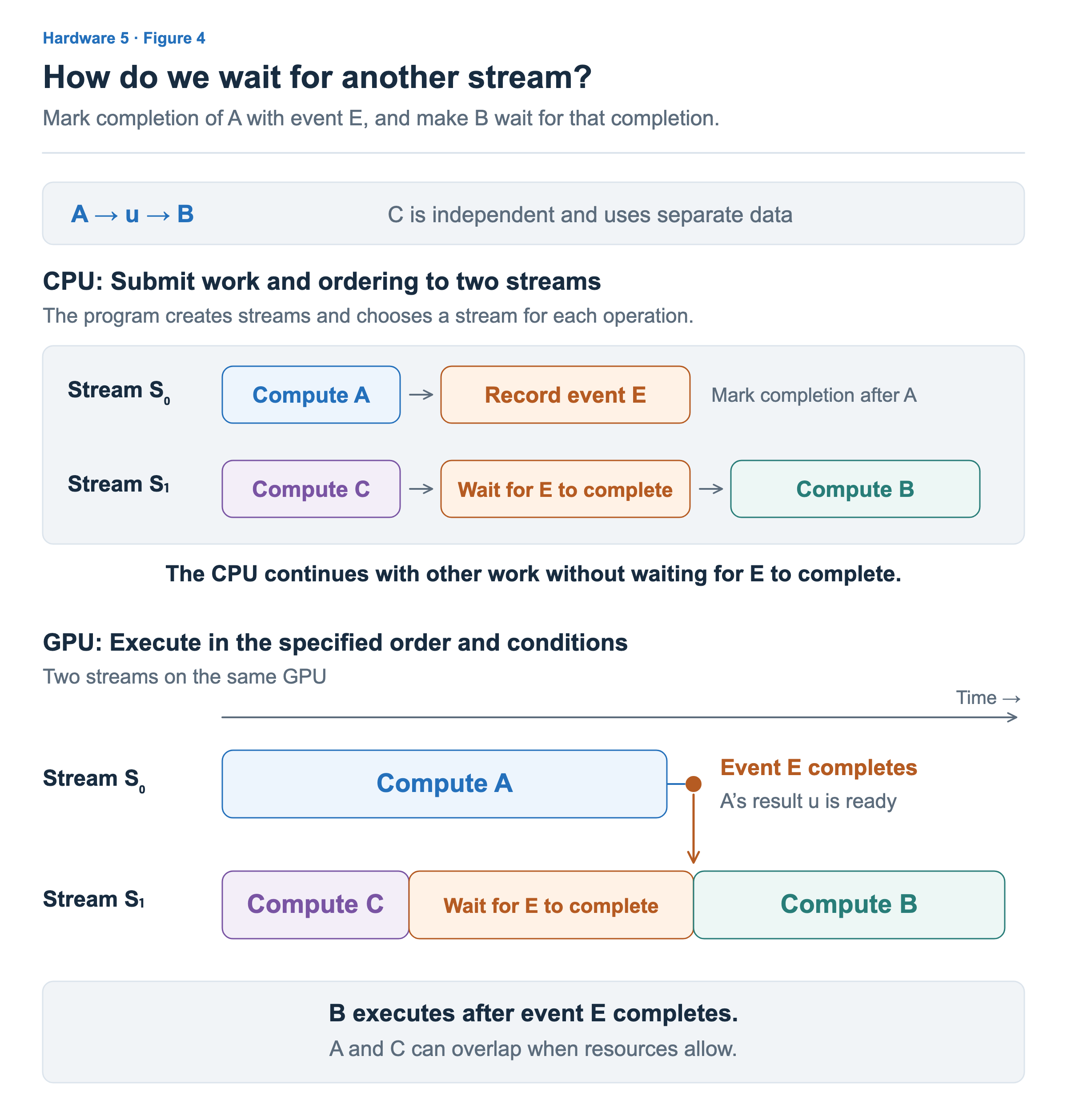
The top of Figure 4 shows the order in which the CPU submits work, while the bottom shows when it actually executes on the GPU. In the bottom half, C finishes first, but A is still running. S₁ therefore waits for event E to complete. When A finishes and E completes, the wait condition is satisfied and B can execute.
The following code shows how the CPU requests this sequence. This is a separate example from the earlier single-stream case: the two streams and the event have been created, and GPU buffers and inputs are ready. C uses data separate from A and B. Detailed kernel launch arguments, including stream selection, are omitted, so follow the streams and request order described in the comments.
// Request computation A in S₀.
A<<<...>>>(...);

// Request recording of event E in S₀ to mark completion through A.
cudaEventRecord(E, S0);

// Request independent computation C in S₁.
C<<<...>>>(...);

// Make later work in S₁ wait for event E to complete.
// This call does not make the CPU wait for E to complete.
cudaStreamWaitEvent(S1, E, ...);

// Request computation B in S₁. B executes after E completes.
B<<<...>>>(...);

// The CPU continues with other work without waiting for E.
The important distinction in the code is what each operation applies to, rather than the function names. Recording the event marks A’s completion in S₀, and waiting for the event sets a condition for B to start in S₁. The CPU registers this condition, so it can submit B before E completes and continue with other CPU work. Waiting for an event in a stream
The event does not copy u, either. The data remains in memory on the same GPU, and the event connects the execution order so that A finishes writing before B reads u. This relationship holds even if the waiting interval in the figure shrinks or disappears. For example, if E has already completed before C finishes, B does not need to wait any longer for E after C.
Comparing this with Figure 3 makes it clear who waits. In Figure 3, the CPU thread that needs the result waits for the copy to complete. In Figure 4, the CPU registers an execution condition, and the subsequent GPU operation B affected by that condition waits. Later, when reading y on the CPU or reusing or freeing a buffer, we must separately ensure the completion and data transfer needed for that purpose.
We can now connect CPU calls, GPU execution, and completion checks for using results into one flow. This distinction also matters when examining performance. The duration of a CPU call alone does not tell us how long a GPU computation takes, and using multiple streams alone does not tell us the benefit of parallel execution. In the next article, we will build on this execution flow to explore computation, data movement, and reuse of intermediate results as ways to make GPU work more efficient.