공통 · 2026-09-17
Transferring Data Between GPUs
Prepare communication participants and buffers, connect CPU send/receive submission to GPU execution, and explain overlapping independent computation and safe buffer reuse.
The previous article explored how multiple GPUs can hold a larger model, reduce processing time, or increase throughput. When computation is split across GPUs, one GPU may need a result produced by another. Where should the data be prepared, who requests the transfer, and when can computation on the receiving side begin?
This article follows a value produced on one GPU as another GPU receives it and uses it in the next computation. We first prepare the communication participants and space for the data. We then submit computation and send/receive operations, and examine how execution order connects the two GPUs. Finally, we look at performing independent computation during communication and at when the same memory can be written with the next values.
The example is simple. Computation A on GPU 0 produces x = [1, 2, 3, 4]. Computation B on GPU 1 doubles each element of the received x to obtain y = [2, 4, 6, 8]. In this article, A produces the values to transfer, and B uses them.
Recall the execution model from Article 5. CPU code requests GPU work, and the GPU executes the submitted operations. Operations submitted to the same stream proceed in order, and the CPU call finishes at a different point from the GPU operation. We will now connect this execution flow across two GPUs.
Choosing the GPUs That Participate in Communication
The figures assume that GPU 0 and GPU 1 are in one server: a single computer. We run two programs on this computer, assigning one GPU to each. A process is an instance of a running program. Even when the same program is started twice, each instance can be a separate process.
The CPU code in process 0 requests work on GPU 0, and the CPU code in process 1 requests work on GPU 1. Having two processes does not mean having two physical CPUs. Both processes’ CPU code can run on cores of the same CPU.
We will use NCCL, NVIDIA’s communication library, for GPU communication. This example uses send and receive functions called from the CPU. When the program requests communication through NCCL, the library constructs the work needed to carry out that request.
First, we configure the two GPUs as participants in the same communication group. A communication group brings together the participants that will communicate. Within the group, each participating GPU is assigned a number called its rank. Here, GPU 0 is rank 0 and GPU 1 is rank 1. The GPU number identifies the device, while the rank identifies a participant in this communication group. We use matching numbers here, but they do not always have to match.
The two processes do not have to run different source files. We can start the same program twice and use the number assigned to each instance to give one the sending role and the other the receiving role. A process is a running instance of a program, while a rank identifies a participant within a communication group. The program or framework’s partitioning rules determine which computation and data each participant handles.
Each process prepares a communication object called a communicator. These are comm₀ and comm₁ in the figure. Each is associated with its assigned GPU and rank, and is used to communicate within the same group. During initialization, the two processes share a common identifier to establish that they belong to the same group. Subsequent send and receive requests specify this communication object and the peer’s rank. Preparing NCCL communication groups and communicators
Deciding who handles which GPU and which participant in which group to communicate with is the starting point for preparing the communication environment. Our two processes each handle one GPU, but a single process can handle multiple GPUs, and a communication group can span multiple servers.
Preparing Send and Receive Buffers
Once the peers are chosen, we need space for the data. Memory used to read and write data is called a buffer. On GPU 0, we allocate a send buffer for x; on GPU 1, we allocate a receive buffer for the incoming x. GPU 1 also needs separate space for B’s result y.
Each process’s CPU code requests these allocations. The allocated space is in GPU memory, and computation A on GPU 0 writes [1, 2, 3, 4] into the send buffer. Having the CPU request the allocation does not mean the values must also be produced on the CPU.
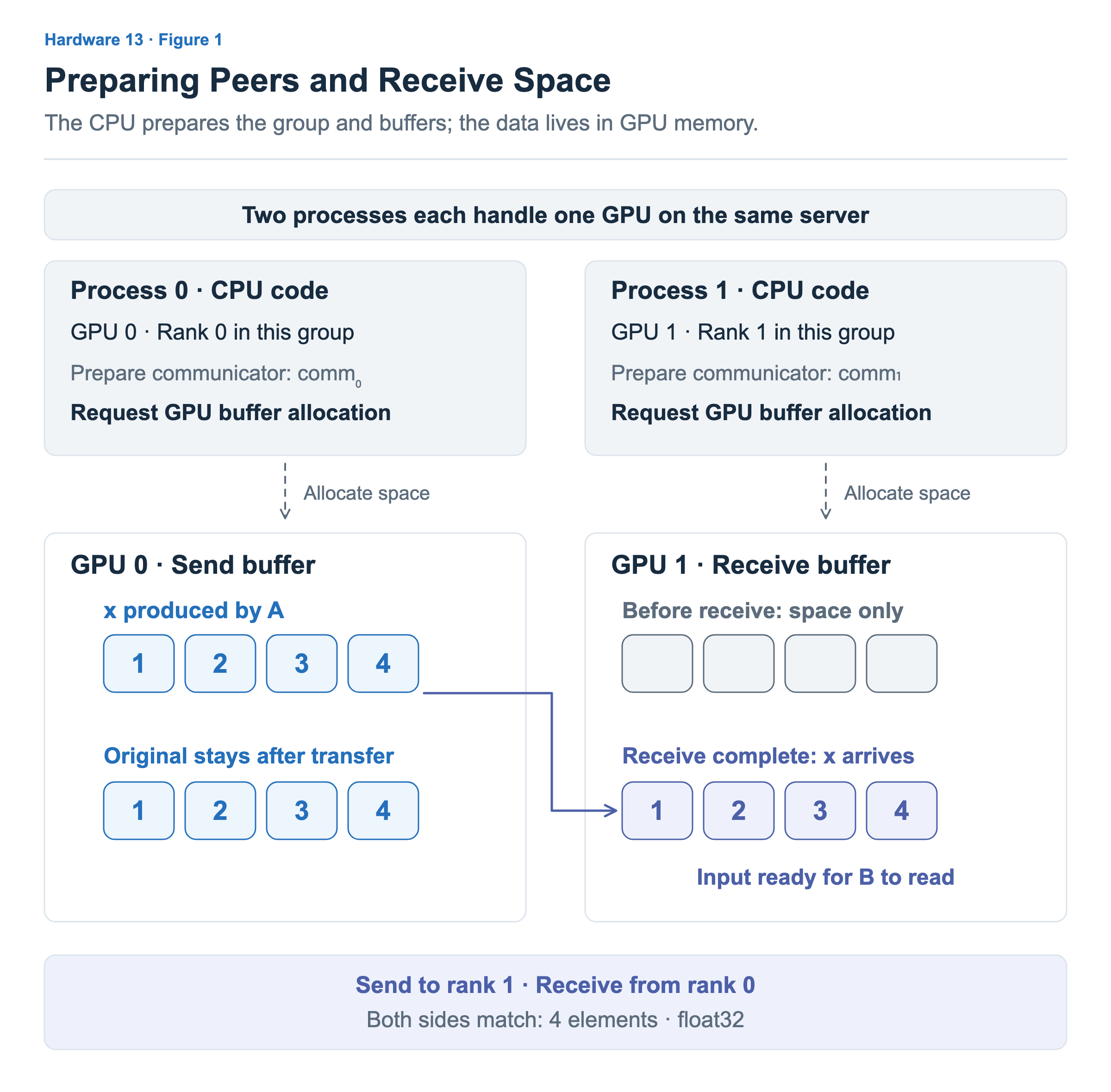
The empty cells on GPU 1 in Figure 1 show that only the receive space has been prepared. GPU 0’s x has not arrived yet. Once the receive finishes, this space contains [1, 2, 3, 4], ready for B to use as input. The transfer does not remove the original values on GPU 0. After the send, both GPUs’ buffers contain the same values.
Both sides must agree on the peers and the size and type of the data. GPU 0 requests to send four elements to rank 1, and GPU 1 requests to receive four elements from rank 0. We use float32, a 32-bit floating-point type, on both sides. NCCL’s element count is not a byte count: here, count is 4 and the data size is 16 bytes. NCCL send and receive functions
Submitting Computation and Communication from the CPU
The two processes now submit work to their respective GPUs. We place computation A → send in one stream on GPU 0, and receive → computation B in one stream on GPU 1. Stream S₀ on GPU 0 and stream S₁ on GPU 1 are separate execution flows on different GPUs.
NCCL’s send function is ncclSend, and its receive function is ncclRecv. In this example, both are called from CPU code, outside the GPU kernels. Each call specifies the prepared buffer and communicator, the peer rank, the stream to use, and other arguments.
The code below omits details to show only the submission order. You do not need to interpret CUDA or NCCL syntax. Follow the comments to see what is requested first on each GPU. The ... marks omitted arguments; these are not complete, runnable programs. We assume each process has already selected its GPU and prepared its communicator, buffers, and stream.
// CPU code in process 0 — use stream S₀ on GPU 0.

// 1. Submit A: produce x in the send buffer.
A<<<...>>>(...);

// 2. Submit the send in the same stream.
//    Send the x produced by A to rank 1.
ncclSend(...);
// CPU code in process 1 — use stream S₁ on GPU 1.
// 1. Submit a receive for x from rank 0.
ncclRecv(...);
// 2. Submit B in the same stream.
// Read the received x and write doubled values to result buffer y.
B<<<...>>>(...);These two code blocks run in their respective processes. They do not mean that all of process 0’s code runs before process 1’s code. Nor do the two processes have to call the send and receive functions at exactly the same time. However, both a send request and a matching receive request are required. A request from just one side cannot complete this transfer. NCCL two-sided communication
The CPU submits work through these calls. The actual data transfer and GPU computation proceed as the submitted operations execute. Returning from ncclRecv to the next line therefore does not mean the received x is already available for use. A communication call may take time for internal preparation, but its return alone does not guarantee completion of GPU communication. NCCL and CUDA streams
Connecting Execution on Two GPUs Through Send and Receive
Can the CPU submit B without explicitly checking that the receive has finished? If B is submitted after the receive in the same stream, B executes only after that preceding operation completes. Figure 2 shows this relationship on a timeline.
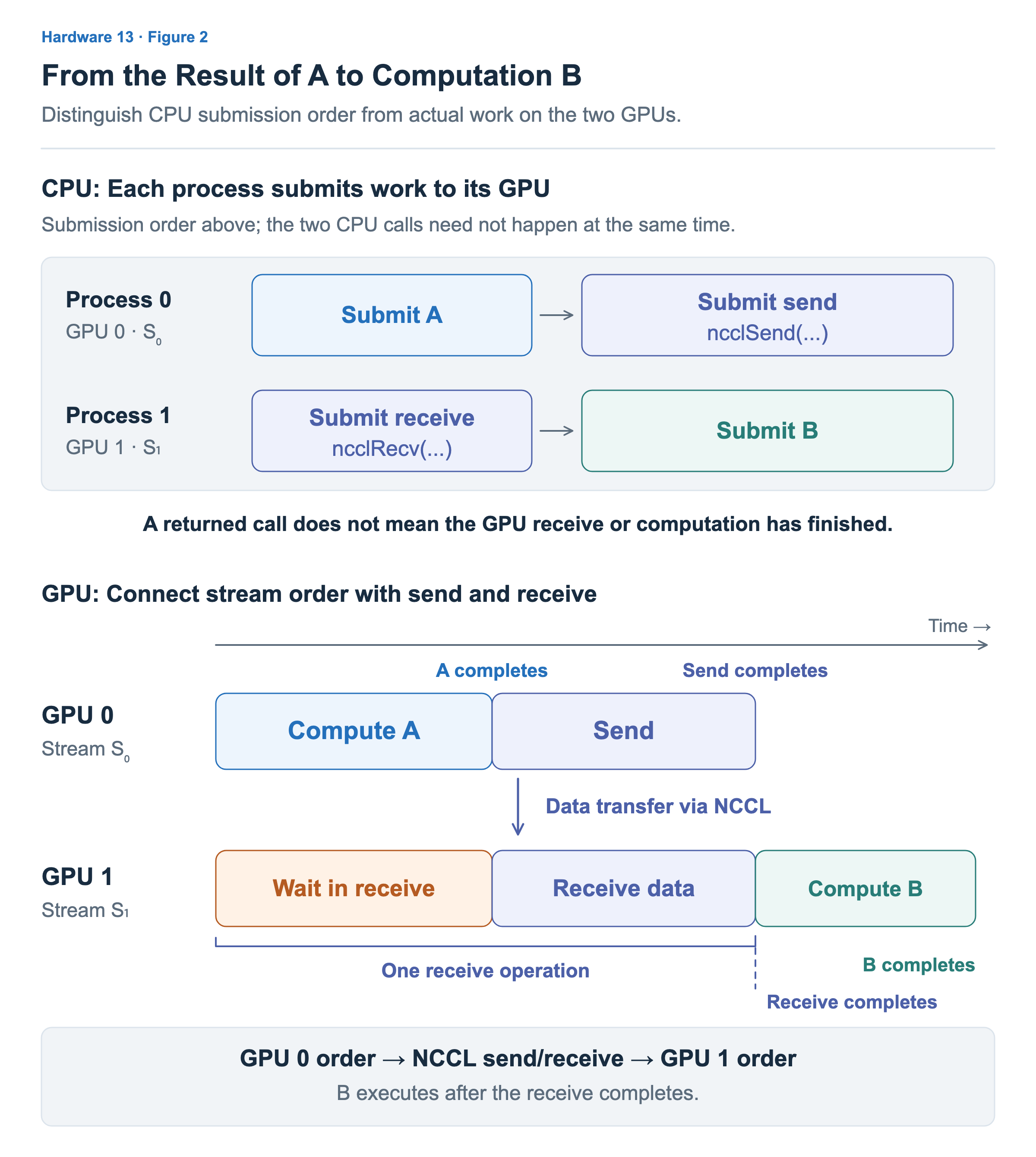
The top shows the submission order in each CPU process; the bottom shows actual execution on the two GPUs. The lower timeline depicts a case in which GPU 1’s receive starts first. Read it in this order:
- A executes on GPU 0 and produces x in the send buffer. The receive has started on GPU 1, but it waits because the data to be transferred is not ready yet.
- Once A finishes, the send proceeds in the same stream on GPU 0. NCCL’s matching send and receive operations transfer x into GPU 1’s receive buffer.
- Once GPU 1’s receive completes, B executes as the next operation in that stream. B reads the completed x and produces y.
This requires both ordering within each GPU and transfer between GPUs. GPU 0’s stream places the send after A, NCCL connects the two participants’ send and receive operations, and GPU 1’s stream places B after the receive. Creating two streams alone does not arrange the data transfer between different GPUs.
The send interval and the data-transfer part of the receive interval represent participation in the same transfer. We do not add them as though all the sending time elapses first and all the receiving time follows. The duration of a receive that starts early can include waiting for the peer’s data to become ready.
In this example, the CPU does not need to wait for A, the send, and the receive to finish one by one before requesting the next operation. The streams and send/receive relationship connect the required order. Work waiting behind a receive on GPU 1 does not mean that subsequent CPU code or all work on every GPU must also stop.
Performing Independent Computation During Communication
B needs the received x, so it must wait for the receive. Now suppose GPU 1 also has computation C, which uses separate input and output space. C does not read x or modify data used by the transfer or B. It therefore has room to proceed before x arrives.
If receive, C, and B are placed in one stream in that order, C also waits for the receive to finish. This time, we prepare two streams on GPU 1: a communication stream for the receive and a compute stream for C and B. The developer, framework, or library chooses which streams to create and where to submit each operation. Here, process 1 submits work to both streams on GPU 1. Creating two streams does not create two additional CPU processes.
Even after separating the streams, we must preserve the requirement that B execute after the receive completes. We use the event mechanism introduced in Article 5. Process 1’s CPU code first submits the recording of event E after the receive in the communication stream. It then submits C, a wait for event E to complete, and B in the compute stream, in that order.
GPU 1 communication stream: receive → record event E
GPU 1 compute stream: C → wait for event E to complete → B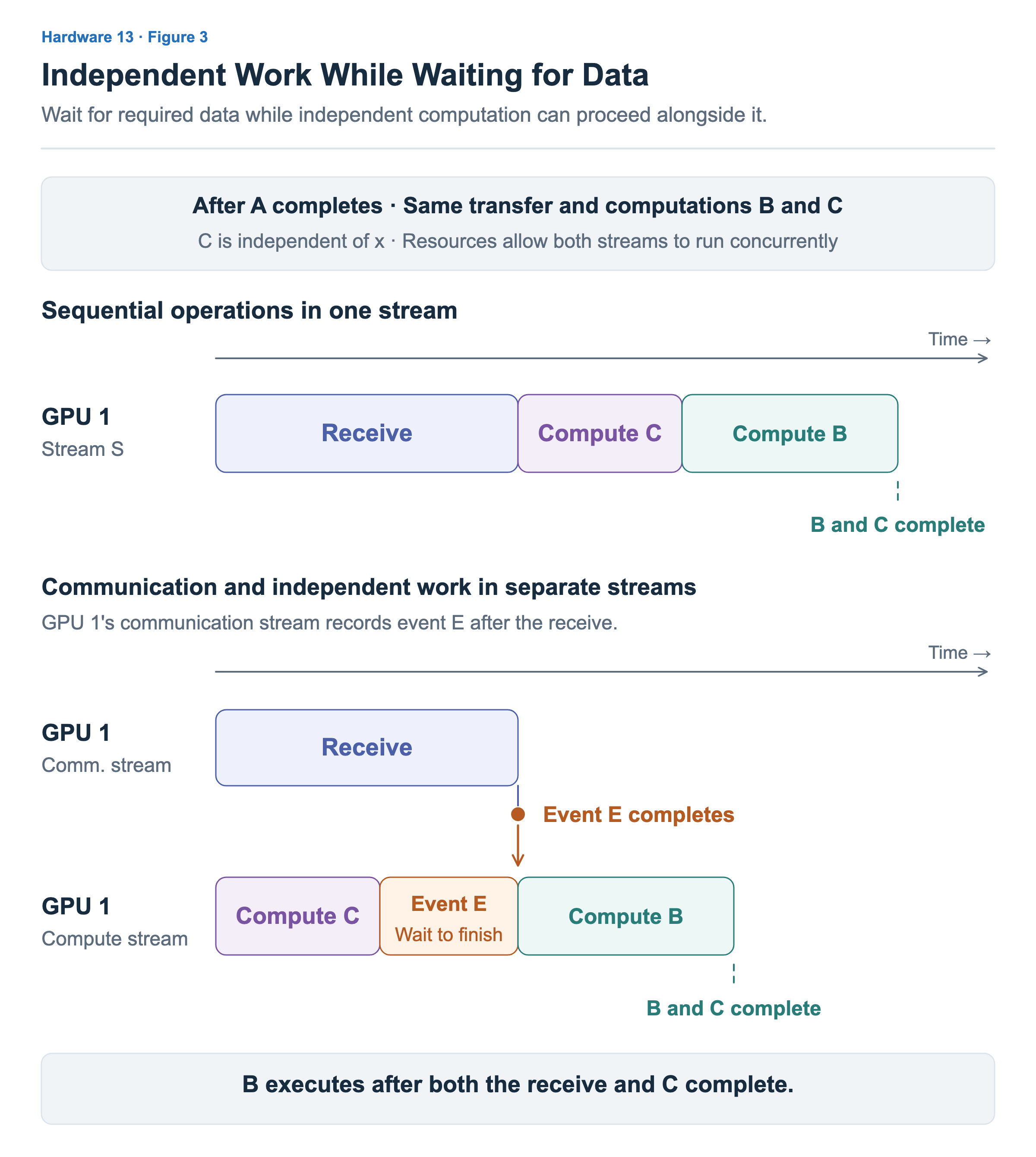
Figure 3 compares the intervals after A completes. The data to transfer and computations B and C are the same in both cases. At the bottom, C executes while the receive proceeds. Even if C finishes first, B waits if event E has not completed yet. This waiting condition is satisfied when the event recorded after the receive completes. Connecting stream order with CUDA events
Here, “wait for event E to complete” is a condition that delays the execution of B later in the compute stream. It does not mean the CPU stops and waits for the event. This event connects receive completion on GPU 1 to its compute stream. The previously submitted NCCL send and receive operations handle transferring the data from GPU 0 to GPU 1.
For the receive and C to overlap, the hardware and execution resources must allow it. Two streams do not each reserve half of the GPU’s resources, and resource contention between the operations may lengthen each one’s duration. The figure shows a case in which they can overlap. To determine whether execution actually improves, check whether the time to finish the receive, B, and C together decreases.
Reusing Buffers After Their Last Use
Repeating the same computation over multiple inputs means reusing buffers for the next data. Can the send buffer and receive buffer be overwritten at the same point? Their last users differ, so the points at which they can be reused differ too.
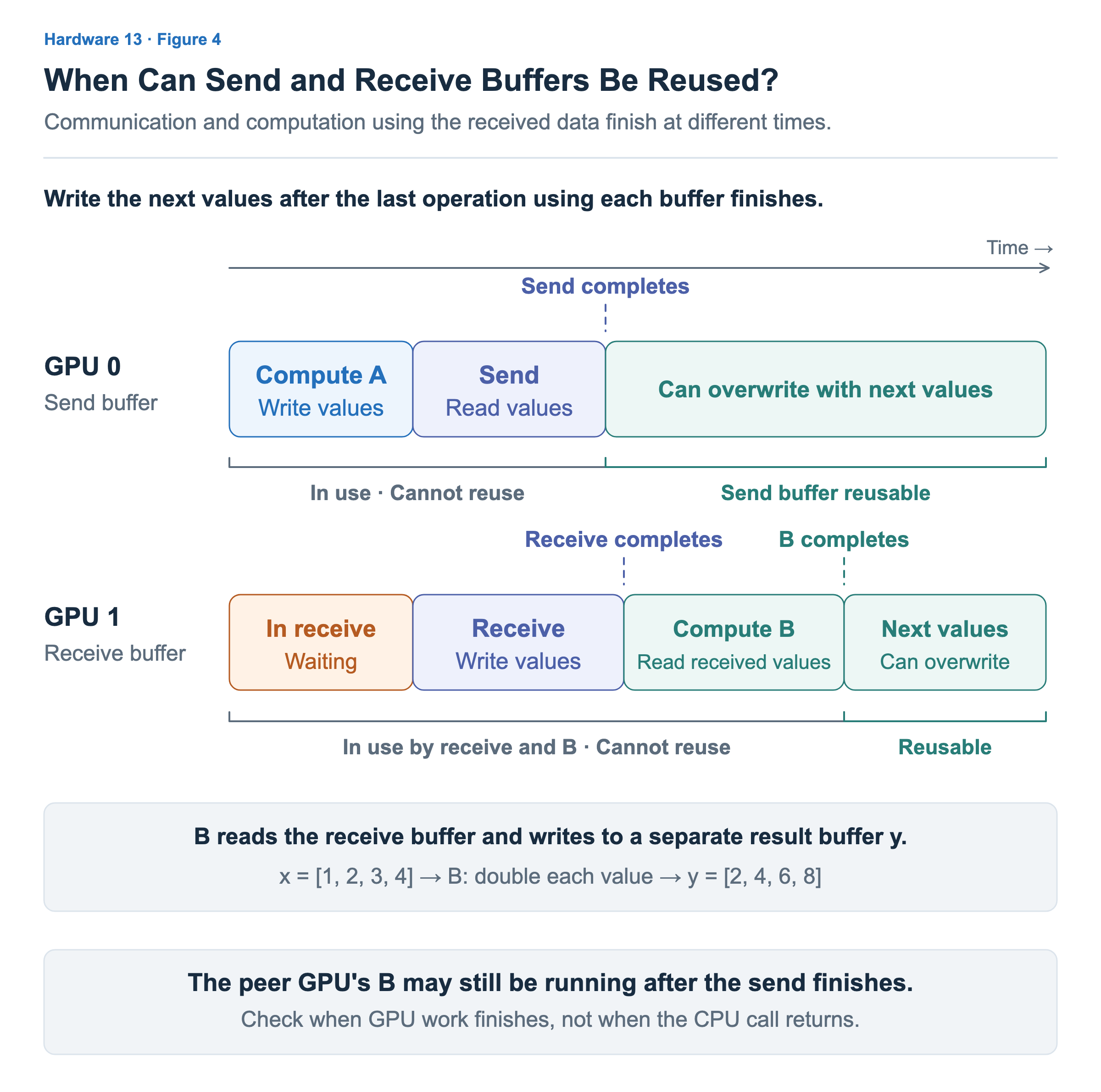
A writes GPU 0’s send buffer, and the send operation reads it. If A for the next input overwrites the values while the send is still using the buffer, the data to be transferred may change. We therefore write the next values after the send operation completes on the GPU. The CPU’s ncclSend call returning is not sufficient.
The receive writes GPU 1’s receive buffer, and B then reads it. Receive completion is the point at which B can start using the values. The same space can receive the next data only after B has finished using those values. In our example, we reuse the receive buffer after B completes. B writes its output to a separate result buffer y, so this discussion concerns the lifetime of input x.
Consequently, the send completing on GPU 0 does not mean B has also finished on GPU 1. Send completion, receive completion, and completion of the computation using the received data must be distinguished. The two rows in Figure 4 mark when no operation is still using each buffer.
The CPU does not have to wait on every reuse. Submitting “A → send → next A” in the same stream on GPU 0 places the next A after the send. Likewise, “receive → B → next receive” in one stream on GPU 1 protects buffer use through ordering. If the next write proceeds in another stream, we must explicitly connect the required completion relationship, for example with an event as above.
There are also times when the CPU needs to check completion. For example, before cleaning up buffers and communication resources after GPU work finishes, we must ensure the work using those resources has completed. One way for the CPU to wait for a particular stream to finish is cudaStreamSynchronize. Waiting on a stream with work submitted through B also confirms B’s completion. Waiting for CUDA stream completion
If the CPU needs to read the actual values of y, one more step is required. Even after B finishes, y is still in GPU memory. As in Article 5, we must copy the result to CPU memory and ensure that copy completes. Waiting for completion and moving data are separate operations.
During repeated execution, we can keep the prepared communication group and buffers, reusing each buffer for the next operation after its last use finishes. This article connected CPU preparation and submission, send/receive and computation across two GPUs, and reuse after the last use. In the next article, we will look beneath these communication calls at which execution devices move the data and which connections it travels over.