Shared Concepts · Hardware · 2026-09-18
How Should We Arrange Multiple GPUs?
First partition the model so the workload can run, then replicate that configuration and adjust GPU placement for latency and throughput.
When using multiple GPUs, the first problem is to load the model and build a configuration that can actually process the workload. Once that works, we can add more groups running the same model to handle different inputs. We then adjust whether to devote more GPUs to one model’s computation or keep more independent replicas.
This article uses inference with a Dense model that processes independent requests using fixed weights to examine how a TP-partitioned model can be replicated with DP.
First, make room to run the workload
Loading model weights onto a GPU does not by itself make the workload runnable. Memory is also needed for activations produced during computation, state maintained for each request, communication buffers, and other uses. A configuration is feasible when the values needed to process the target inputs fit on each GPU.
If the weights are too large, the model can be partitioned across GPUs. TP divides weights and their computation, while PP divides model layers. For a MoE model, EP can partition expert weights. If activations or a long context consume much of the memory during execution, SP or CP can also be considered. If one GPU already handles the required workload adequately, there is no need to start by partitioning it.
For the figure, suppose the model weights occupy 24 GiB and each GPU has 24 GiB available. GiB is a capacity unit based on powers of two. We assume another 8 GiB per GPU for request state, activations, buffers, and other execution memory besides weights.
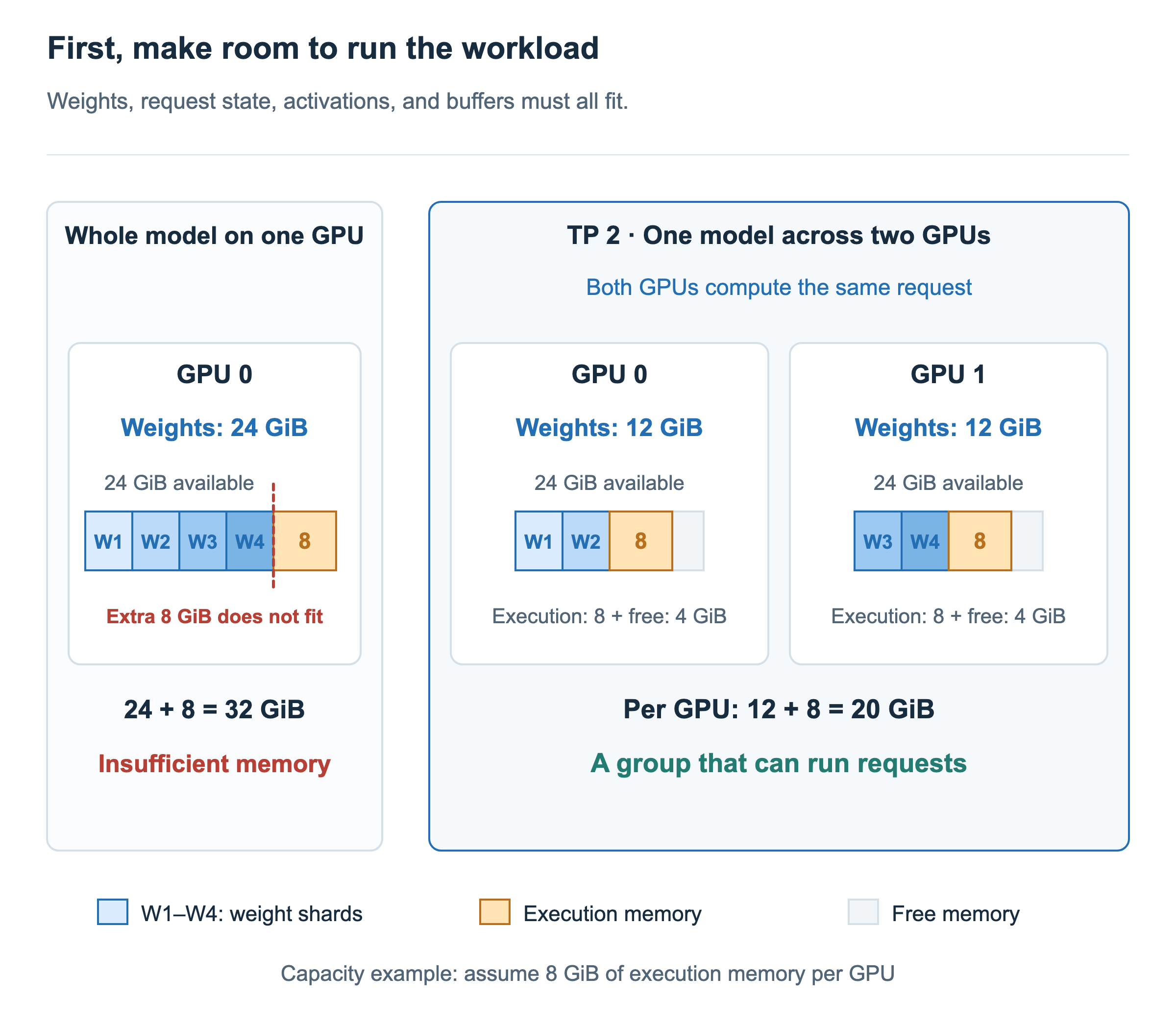
On the left, weights alone consume all 24 GiB. Adding the 8 GiB needed for execution brings the total to 32 GiB, which does not fit. Connecting more GPUs does not automatically turn their memory into one large space: the configuration must actually partition weights or data used during execution.
On the right, TP partitions the weights across two GPUs. W1 through W4 represent four weight shards. GPU 0 holds W1 and W2, while GPU 1 holds W3 and W4, reducing weights per GPU to 12 GiB. Adding 8 GiB for execution gives 20 GiB, leaving 4 GiB free. The two GPUs can now form a group that jointly computes each request.
These numbers illustrate a capacity relationship. In practice, not all weights may partition evenly, and execution memory changes with input length, the number of requests processed together, and TP size. Peak memory use and headroom therefore need to be checked while running the target workload.
Replicate the working group to increase throughput
Suppose two GPUs can now process the workload, and two more GPUs are available. We can place the same weight shards from GPUs 0 and 1 on GPUs 2 and 3 to create another model replica. Running that additional model replica also takes two GPUs.
In the next figure, requests A and B go to group 1, and C and D go to group 2. W shards with the same name and color contain identical weights. Double-headed arrows indicate communication within a group.
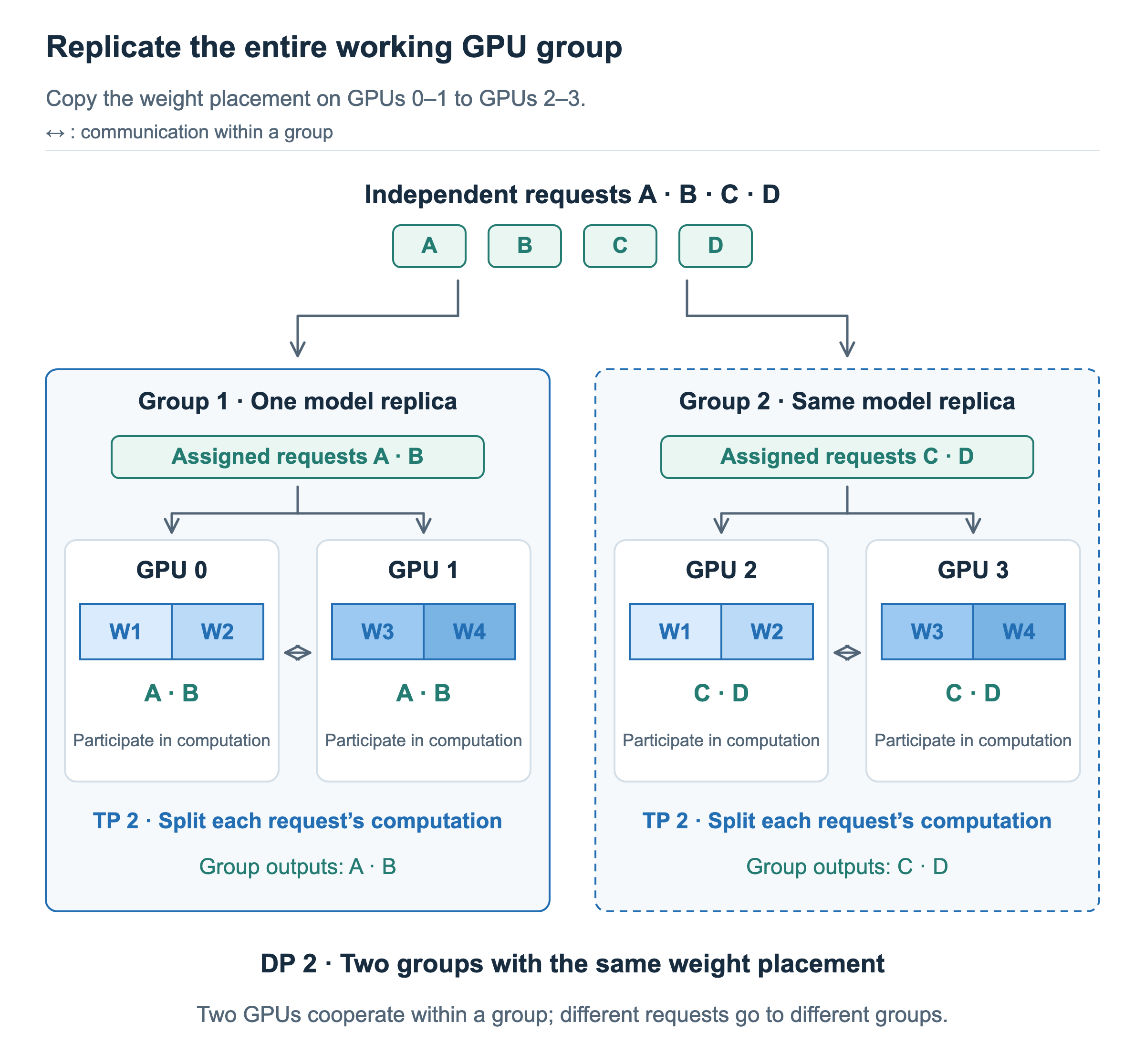
Within group 1, both GPU 0 and GPU 1 participate in computing A and B. They hold different parts of the weights, so each performs its assigned computation and exchanges the required results. GPU 0 does not handle only A while GPU 1 handles only B. In group 2, the two GPUs similarly compute C and D together.
The two groups, however, process different requests independently. Each group maintains the state of its own requests and does not need to combine intermediate results with the other group. This is TP 2 × DP 2. TP 2 means that two GPUs jointly process one partitioned model replica, and DP 2 means running two copies of that configuration. The unit replicated by DP may be a single GPU or a model replica spanning multiple GPUs.
More replicas create room to process more requests in the same amount of time. The number of GPUs participating in one request stays the same, while more groups become available for other requests. Throughput can increase when enough requests arrive and work is distributed evenly across the groups.
Adjust GPUs per model and the number of replicas
Being able to run on two GPUs does not mean using the remaining GPUs for replication is always optimal. The same four GPUs can hold two model replicas on two GPUs each, or one model replica on four GPUs. We first found a configuration that could run the workload; now we compare performance among feasible configurations.
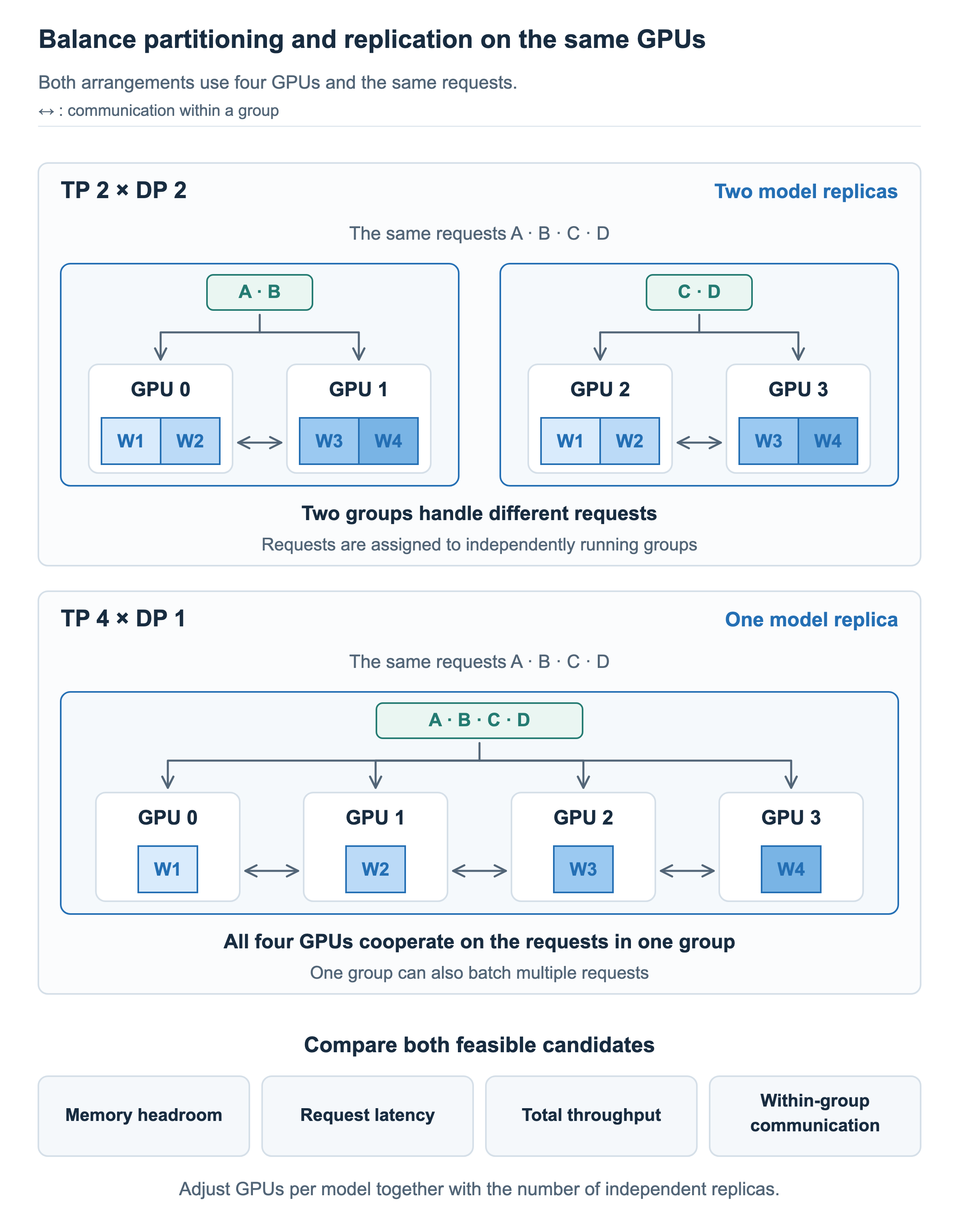
In TP 2 × DP 2 at the top, requests are assigned to two groups. In TP 4 × DP 1 below, all four GPUs form one group and participate in computing the requests. One group can also batch multiple requests together. Having one replica therefore does not restrict it to processing one request at a time.
Increasing TP size can distribute weights and the computation that can be partitioned across more GPUs. It may shorten execution time for one request or increase memory headroom, but communication and waiting between operations also matter. Four participating GPUs are not always faster than two.
Conversely, smaller TP groups allow more replicas on the same GPU budget. More groups can handle different requests, but each group’s processing speed and the number of requests it can batch affect total throughput. Doubling the number of replicas alone does not establish that total throughput doubles.
Compare latency and throughput together. Latency runs from a request’s arrival to its completion, including time spent in a queue. Throughput is work completed per unit time. With the same model, precision, input and output lengths, and arrival conditions, compare sustained throughput within the allowed latency target. Examine slow requests as well as the average.
Which GPUs form each group also matters. If links within GPUs 0–1 and within GPUs 2–3 are fast, but the connection between those pairs is slower, keeping TP’s repeated communication inside each fast-connected pair may be beneficial.
First make the workload runnable, replicate that configuration, then adjust partitioning and replication to meet the actual goal. This is a starting order for reasoning. Changing placement can change whether computation, communication, or request queueing limits the overall run, so memory, latency, and throughput must be checked again in the new configuration.